Hadoop and HDFS
This lecture introduces Hadoop (history, storage before Hadoop, three layers). Then it explains HDFS blocks, replication and the read and write pipelines. After this page you can count blocks, replicas and raw storage by hand.
 Big Data Tutorial For Beginners
 HDFS
HDFS Know About Name Node and Data Node Communication in Hadoop
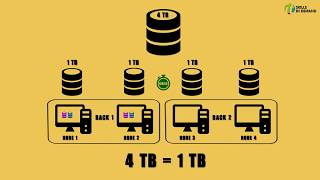 How Hadoop Works
Why Hadoop existsSearch on YouTube
Before the internet, data volumes were small and mostly structured. One central server could store them. Then the internet grew fast. It created large volumes of semi-structured and unstructured data. A single server could no longer store or process them well.
The answer was distributed storage on many machines with parallel processing. Hadoop is the framework that provides both. It stores data across a cluster of commodity hardware. It also processes the data in parallel on those same machines.
Storing data before HadoopSearch on YouTube
The slides show three stages of storage growth:
- Single PC. One machine with its CPU.
- PCs with NAS. Network Attached Storage: a file-dedicated storage device on the network. It uses hard disk drives (HDDs) and solid-state drives (SSDs).
- PCs with SAN. Storage Area Network: a dedicated high-speed storage network.
NAS is a file-dedicated storage device. It makes data continuously available, so employees collaborate over a network. SAN is a dedicated network that combines servers, storage systems, networking switches, software and services. It is tailored to one environment.
| SAN | NAS |
|---|---|
| Network of many devices | Single storage device or RAID |
| Block storage system | File storage system |
| Fibre Channel network | TCP/IP Ethernet network |
| Optimised for many users | Limited users |
| Faster performance | Limited speed |
| Highly expandable | Limited expansion options |
| Higher cost and complex setup | Lower cost and easy setup |
Neither NAS nor SAN scales to big data. Hadoop became the solution for effective storage and faster processing of larger data.
What Hadoop isSearch on YouTube
Hadoop is a framework that stores large volumes of data on several nodes. It also processes the data in a parallel manner. Doug Cutting created Hadoop in 2006. He founded Cloudera.
The slide timeline names the milestones: Google published the GFS and MapReduce papers. Cutting added DFS and MapReduce support to Nutch. Yahoo hired Cutting, and Hadoop spun out of Nutch. Facebook launched Hive (SQL support for Hadoop). The timeline also lists famous scale records: the New York Times converted 4 TB of image archives on 100 EC2 nodes. Yahoo sorted 1 TB in 3.5 minutes on 910 nodes, then in 62 seconds on 1,460 nodes. Yahoo sorted 1 PB in 16.25 hours on 3,658 nodes. Hadoop Summit 2009 drew 750 attendees.
Key features of HadoopSearch on YouTube
- Scalability. Hadoop handles large data by adding more nodes to the cluster.
- Flexibility. Hadoop supports structured, semi-structured and unstructured data.
- Cost-effective. Hadoop is open source and runs on commodity hardware.
- Fault tolerance. Hadoop keeps data available even when nodes fail.
Three layers of Hadoop architectureSearch on YouTube
Hadoop has three major layers. Storage at the bottom, resource management in the middle, processing on top:
- HDFS (Hadoop Distributed File System): the storage layer.
- YARN (Yet Another Resource Negotiator): the resource management layer.
- MapReduce: the processing framework layer.
MapReduce and YARN internals belong to the next lecture (MapReduce and YARN).
HDFS in one paragraphSearch on YouTube
HDFS is the primary distributed storage for Hadoop applications. It is fault tolerant, scalable and easy to expand. Data is divided into multiple blocks. HDFS stores the blocks over multiple nodes of the cluster. Applications get interfaces that move computation closer to the data.
HDFS has three core components. The NameNode is the master node (the slides' word): it holds metadata in RAM and on disk. The Secondary NameNode holds a copy of the NameNode metadata on disk. The DataNodes hold the actual data in the form of blocks.
Blocks in HDFSSearch on YouTube
When a file enters HDFS, it is split into fixed-size blocks. Typical block sizes are 64 MB or 128 MB. The slide example uses 128 MB blocks.
blocks counts full and partial blocks. last block is smaller than the rest unless the file fits exactly. raw storage counts every replica.
Worked example. A 542 MB file with 128 MB blocks and replication factor 3.
Step 1. Count the blocks.
Step 2. Find the last block.
The layout is 128, 128, 128, 128, 30 MB. This matches the slide diagram exactly.
Step 3. Find the raw storage.
Step 4. Count the NameNode entries.
The NameNode tracks 15 block locations for this file.
Worked example. A 1000 MB (1 GB) file with 128 MB blocks and replication factor 3.
Replication and rack awarenessSearch on YouTube
Each block is stored on one or more nodes. Each stored copy is called a replica. The default replication factor is 3. A cluster is organised into racks: groups of nodes under one rack switch, joined by a core switch. When the cluster is rack aware, all replicas of one block never sit on the same rack.
first replica: local node · second replica: different rack · third replica: same rack as second
The first replica goes on the local node (the client's own DataNode). The second replica goes to another rack. The third replica shares the second replica's rack. This spreads the 3 replicas over at least 2 racks.
The slides trace a crash. Suppose DataNode 7 crashes. Two replicas of block C survive: one on DataNode 4 of rack 1 and one on DataNode 9 of rack 3. The data stays available. The NameNode then re-replicates the block to restore the factor of 3. A network partition can cause a subset of DataNodes to lose connectivity with the NameNode. Any data registered to the failed DataNode is not available to HDFS. The death of a DataNode may push some blocks below their replication factor, which triggers re-replication.
When re-replication happensSearch on YouTube
- A DataNode becomes unavailable.
- A replica becomes corrupted.
- A hard disk on a DataNode fails.
- The replication factor of the block is increased.
Home, Away, Neighbour
Home = local node · Away = a different rack · Neighbour = the same rack as the second replica. Order matters, and examiners ask for it.
HDFS daemonsSearch on YouTube
NameNodeSearch on YouTube
The NameNode is the heart of the HDFS cluster. It maintains and manages the file system metadata: file names, file locations, block size, block locations, permissions and the replication factor of each file. In a non-high-availability cluster there is only one NameNode. A high-availability cluster can have two NameNodes.
The NameNode keeps the image of the whole file system namespace and the file Blockmap in memory. 4 GB of local RAM supports the structures for a huge number of files and directories.
Two files hold the metadata on the NameNode local file system. FsImage stores the full namespace, including the mapping of blocks to files. EditLog is a transaction log. It records every change to the metadata, for example a new file or a changed replication factor.
At startup the NameNode loads FsImage and EditLog from its local file system. It applies the EditLog to the FsImage. Then it stores a copy of the FsImage as a checkpoint. Periodic checkpointing lets the system recover to the last checkpointed state after a crash.
DataNodes send heartbeats to the NameNode every 3 seconds. They send block reports every 10 seconds. A block report lists all the blocks on that DataNode. When heartbeats stop, the NameNode marks the DataNode as dead and sends no IO requests to it. Missing data then falls below its replication factor, which triggers re-replication.
Write heartbeat every 3 seconds and block report every 10 seconds in the exam. The slides give these values. Real Hadoop sends full block reports far less often, every 6 hours by default (extra).
3, 10, 3
Heartbeat every 3 seconds · block report every 10 seconds · default 3 replicas. One number line covers the common detail questions.
DataNodeSearch on YouTube
The DataNode stores the actual data and runs the computation. It stores each HDFS block in a separate file in its local file system. It has no knowledge of the HDFS file system as a whole. It spreads files over directories with heuristics, so no directory holds too many files. At startup it lists all its HDFS blocks and sends the BlockReport to the NameNode.
The DataNode stores and retrieves blocks when the NameNode asks. It also performs block creation, deletion and replication on instruction from the NameNode. It reads and writes client requests through the block operations channel.
Secondary NameNodeSearch on YouTube
The Secondary NameNode maintains a copy of FsImage and EditLog. It combines both to produce the updated FsImage. It performs checkpointing. The update runs every hour. The slides state that it works as a DataNode in case of NameNode failure.
Do not call the Secondary NameNode a backup NameNode. It only checkpoints FsImage and EditLog. In a high-availability cluster, a separate Standby NameNode takes over on failure.
File system namespace and metadataSearch on YouTube
HDFS shows a hierarchical file system with directories and files. Clients can create, remove, move and rename entries. The NameNode records every metadata change. An application can set the replication factor per file. Block size and replica count are configurable per file. All blocks of a file except the last have the same size. A NameNode metadata entry looks like /users/pkothuri/data/part0, r:3, {1,3,5}. It lists the file block, the replication factor, and the set of DataNodes holding replicas.
HDFS architecture in one pictureSearch on YouTube
The slides summarise HDFS in five steps:
- File splitting. An uploaded file is split into fixed-size blocks.
- Block replication. Each block is replicated across DataNodes (default 3).
- Block reporting. DataNodes periodically report block information to the NameNode.
- Metadata management. The NameNode maintains file names, block locations and permissions.
- Data retrieval. The NameNode gives block locations. The client reads data directly from the DataNodes.
Traffic splits into two channels. Metadata operations run between the client and the NameNode. Block operations run between the client and the DataNodes. DataNodes replicate blocks among themselves. The slide example tracks /home/foo/data with replication factor 3. DataNode 1 holds B1 and B2. DataNode 2 holds B1 and B3. DataNode 3 holds B2 and B3.
HDFS read pipelineSearch on YouTube
The client never asks the DataNode for locations. It asks the NameNode once, then reads directly from the nearest DataNode that holds each block.
- The client opens the file through
DistributedFileSystem. - The client gets the block locations from the NameNode over RPC.
- The client builds an
FSDataInputStream. - The client reads each block as packets from the chosen DataNode.
- The client repeats the read for the next block until the file is complete.
Exam shortcut: the read path touches the NameNode only for metadata. Bulk data never passes through the NameNode. That is why reads scale with the number of DataNodes.
HDFS write pipelineSearch on YouTube
The client writes to only the first DataNode. That node forwards each packet down a pipeline of DataNodes. Acknowledgements flow back up the same pipeline.
- The client asks the NameNode to create the file (
create()). - The NameNode returns the DataNode locations (the slide shows DN1, DN6, DN8 for block A).
- The client builds an
FSDataOutputStreamand writes the first packet to the first DataNode. - Each DataNode forwards the packet to the next node in the pipeline.
- Each DataNode sends an acknowledgement packet back up the pipeline.
- The client calls
complete()when all packets are acknowledged.
Do not send file data to the NameNode. The NameNode handles only metadata and locations. The client streams block data to the first DataNode in the pipeline.
HDFS configurationSearch on YouTube
The slides give the HDFS defaults:
- Block size: 64 MB.
- Replication factor: 3.
- Web UI port: 50070.
The replication example slide uses 128 MB blocks. Both values appear on the slides: 64 MB is the configured default, 128 MB is the worked example size.
The configuration file is /etc/hadoop/conf/hdfs-site.xml:
<configuration>
<property>
  <name>dfs.replication</name>
  <value>3</value>
</property>
<property>
  <name>dfs.namenode.name.dir</name>
  <value>file:///data1/cloudera/dfs/nn,file:///data2/cloudera/dfs/nn</value>
</property>
<property>
  <name>dfs.blocksize</name>
  <value>268435456</value>
</property>
<property>
  <name>dfs.namenode.http-address</name>
  <value>itracXXX.cern.ch:50070</value>
</property>
</configuration>
Worked example. The slide sets dfs.blocksize to 268435456. Convert it to MB.
So this cluster uses 256 MB blocks. The same binary rule gives 128 MB = 134217728 bytes.
Features of HDFSSearch on YouTube
- Failure tolerant. Data is duplicated across DataNodes. The default replication factor of 3 keeps every block on three nodes.
- Scalable. Data transfers run directly with the DataNodes. Read and write capacity grows with the number of DataNodes.
- Cheap to extend. For more disk space, add DataNodes and rebalance.
- Industry standard. Other distributed applications run on top of HDFS (HBase, MapReduce).
- Write-once-read-many. HDFS suits large data sets that are written once and read many times. It is not built for low-latency access.
Quick self-testSearch on YouTube
1. Why did a single central server stop being enough for data storage?
Data volumes grew fast with the internet. Much of the new data was semi-structured and unstructured. One server could not store or process it well, so storage moved to distributed clusters.
2. State one difference each between NAS and SAN on: device, storage type, network, cost.
NAS is a single device, SAN is a network of devices. NAS is file storage, SAN is block storage. NAS uses TCP/IP Ethernet, SAN uses Fibre Channel. NAS costs less and is easy to set up, SAN costs more and is complex.
3. Name the three layers of Hadoop architecture and one role each.
HDFS stores the data in blocks. YARN manages cluster resources. MapReduce processes the data in parallel.
4. A 640 MB file uses 128 MB blocks with replication factor 3. How many blocks, replicas and bytes of raw storage?
blocks exactly, so the last block is a full 128 MB. Replicas . Raw storage MB.
5. A 300 MB file uses 128 MB blocks with replication factor 3. Find the block layout and the raw storage.
, so 3 blocks: 128, 128 and MB. Replicas . Raw storage MB.
6. Where do the three replicas of a block go, and why not on one rack?
First on the local node, second on a different rack, third on the same rack as the second. A rack failure (switch or power) would kill all replicas on one rack, so the rule forces at least two racks.
7. A block has 3 replicas. The DataNode holding one replica crashes. How many replicas remain, and what happens next?
2 replicas remain, so the data is still available. The NameNode detects the missing heartbeat and re-replicates the block to restore 3 replicas.
8. What do FsImage and EditLog store, and which daemon merges them?
FsImage stores the full namespace and block-to-file mapping. EditLog records every metadata change. The Secondary NameNode merges them into a new FsImage every hour (checkpointing).
9. Contrast the read path and the write path through the NameNode.
On a read the client fetches block locations from the NameNode, then streams packets directly from DataNodes. On a write the client calls create(), gets pipeline locations, streams packets to the first DataNode only, and finishes with complete() after the acks return.
10. The config sets dfs.blocksize to 268435456. What block size is that in MB?
MB.
- Hadoop stores big data on clusters of commodity hardware and processes it in parallel. Doug Cutting created it in 2006.
- NAS is file storage on one device over Ethernet. SAN is block storage on a dedicated Fibre Channel network.
- Three layers: HDFS (storage), YARN (resources), MapReduce (processing).
- HDFS splits files into blocks (64 MB default, 128 MB in the slide example). A 542 MB file gives 5 blocks: 128, 128, 128, 128, 30 MB.
- Default replication factor is 3 with placement local, different rack, same rack as second.
- NameNode holds metadata (FsImage plus EditLog). DataNodes hold blocks. Heartbeat runs every 3 seconds, block reports every 10 seconds, checkpointing every hour.
- Reads: locations from the NameNode, data straight from DataNodes. Writes:
create(), pipeline of DataNodes, acks back,complete(). dfs.blocksize = 268435456means 256 MB blocks. Web UI port is 50070.- HDFS is write-once-read-many and not built for low-latency access.