Machine learning with Spark MLlib
This lecture explains why iterative ML needs an in-memory engine and how Spark MLlib provides it. It covers the spark.ml building blocks and every Feature Transformer on the slides. After this page you can scale features by hand and compute Pearson and Spearman correlation step by step.
 Apache Spark MLlib TutorialUnboxing Big Data · Feature transformation: StringIndexer, scaling
 Build ML Pipelines using SparkML in PySparkAbhishek mamidi · ML pipelines in PySpark
 Spearman Rank Correlation [Simply explained]numiqo · Spearman rank correlation
 Machine Learning using Apache SparkAIEngineering · Spark ML overview
Why big data needs a different approach to MLSearch on YouTube
Classical ML tools assume the full training set fits in the RAM of one computer. Tools like scikit-learn and single-machine R work this way. Big data breaks that assumption. Training sets can span hundreds of GB to TB across a cluster.
A distributed compute framework must sit under the ML library. Spark provides that framework for MLlib. There are two broad families of big-data compute frameworks: disk-based (Hadoop MapReduce) and memory-based (Apache Spark, Apache Flink).
Most ML algorithms are iterative. Gradient descent, K-means and PageRank-style updates scan the same data many times. This repetition is exactly where disk-based and memory-based engines differ most.
Disk-based frameworks: Hadoop MapReduceSearch on YouTube
Every Map or Reduce stage reads its input from HDFS disk. It writes its output back to HDFS disk before the next stage starts. For an iterative algorithm with iterations, the full dataset passes through disk roughly times. Each iteration boundary costs one write plus one read.
= number of iterations. Each iteration writes the dataset to HDFS once and reads it back once.
Fault tolerance comes from HDFS replication. Each block is stored about times on different nodes. A failed task re-runs against a replica of its input from another node. This design is simple and robust. Its weakness is cost: the disk I/O that makes recovery easy is paid on every iteration, even when nothing fails. Early Hadoop-based ML tools such as Apache Mahout were slow for iterative algorithms for this reason.
In-memory frameworks: SparkSearch on YouTube
The core abstraction is the RDD (Resilient Distributed Dataset). An RDD is an immutable, partitioned collection spread across cluster memory. Data can stay resident across operations with .cache() or .persist(). It is not reloaded from disk each time.
For an iterative ML algorithm, load the data once and cache it. All iterations then run against the in-memory RDD or DataFrame. Disk is touched once, not times. Spark is not purely memory-bound. Cached data that does not fit in RAM spills to disk automatically. This spilling keeps Spark production-safe instead of memory-only.
Disk-based vs in-memory side by sideSearch on YouTube
| Point | Hadoop MapReduce (disk-based) | Apache Spark (in-memory) |
|---|---|---|
| Data storage between stages | Written to and read from HDFS at every stage | Cached in RAM as RDD or DataFrame; spills to disk only if needed |
| Cost of iterations | full read/write disk passes | disk read, then in-memory passes |
| Typical ML library | Apache Mahout (MapReduce-based) | Spark MLlib (spark.ml) |
| Programming model | Rigid two-stage Map then Reduce | General DAG of operations (map, filter, join) |
| Fault tolerance | Data replication (HDFS, by default) | Lineage-based recomputation of lost partitions only |
| Best suited for | Single-pass batch ETL | Iterative ML, graph algorithms, interactive queries |
Why this matters for MLSearch on YouTube
Worked example. K-means with iterations over a cached dataset.
Hadoop and Mahout style. Every iteration reads the full dataset from HDFS and writes it back.
Spark MLlib style. The dataset is read once, cached, and reused from memory.
The slide cites a Databricks logistic regression benchmark from 2014: Hadoop took s and Spark took s. This is a historical marketing figure. Real speedups vary by workload and cluster size. The lesson is the shape of the result: in-memory iteration beats disk-based iteration.
The slides state the research motive directly. Spark's original paper introduced RDDs for this workload. The spark.mllib and spark.ml packages exist as Spark's own ML library instead of Hadoop-based Mahout.
Fault tolerance: RDD lineageSearch on YouTube
RDDs do not rely on data replication by default. Spark tracks lineage instead: the DAG of transformations used to build each RDD from its source. If a partition is lost (a worker node crashes), Spark recomputes only that lost partition. It replays the recorded lineage from the nearest available data. It never re-runs the whole job.
MapReduce fault tolerance means data replication ( in HDFS) plus re-running the failed task. Spark fault tolerance means lineage-based recomputation of only the lost partition. It is cheaper on storage and often cheaper on recovery time too.
Long iterative ML jobs grow very long lineage chains ( iterations give chained transformations). Spark lets you checkpoint an RDD: persist it to reliable storage and truncate the lineage graph. Recovery then replays fewer steps from the source.
Spark MLlibSearch on YouTube
MLlib is Spark's machine learning library. It runs on the in-memory engine above, so it inherits the speed advantage. The slides cite up to faster than Mahout in memory and faster on disk. Like any such figure, this depends on the workload. You write MLlib applications in Java, Scala or Python.
MLlib: what it providesSearch on YouTube
- ML algorithms. Common learning algorithms: classification, regression, clustering and collaborative filtering.
- Featurization. Feature extraction, transformation, dimensionality reduction and selection.
- Pipelines. Tools to construct, evaluate and tune ML pipelines.
- Persistence. Save and load algorithms, models and pipelines.
- Utilities. Linear algebra, statistics and data handling.
RDD-based vs DataFrame-based APISearch on YouTube
MLlib was first RDD-based. Since Spark 2.0, the RDD-based spark.mllib package is in maintenance mode. The primary ML API is now the DataFrame-based spark.ml package. DataFrames give a friendlier API plus Spark Data Sources, SQL and DataFrame queries, Tungsten and Catalyst optimizations, and uniform APIs across languages. The DataFrame API unifies ML algorithms across languages and makes feature-transformation pipelines easy to build.
Main conceptsSearch on YouTube
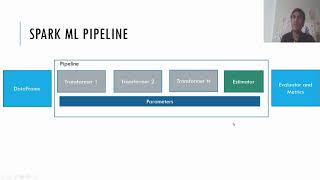
The spark.ml API has five building blocks. A DataFrame holds the data. A Transformer converts one DataFrame into another. An Estimator is a learning algorithm that produces a model. A Parameter configures either one. A Pipeline chains stages together.
DTEPP: Data Turns, Estimators Produce, Pipelines Pack
DataFrame in · Transformer changes it · Estimator learns a model. Parameters tune stages · Pipeline chains them.
DataFrameSearch on YouTube
A DataFrame resembles a table in an RDBMS. You create one from files, RDDs or other data sources. It supports many data types such as text, images and structured data. Access data by column.
TransformersSearch on YouTube
A Transformer converts one DataFrame into another by appending one or more columns. It implements a transform() method. There are two broad kinds:
- Feature Transformers. Tokenization, normalization and hashing.
- Learned models. The result of fitting an Estimator.
EstimatorSearch on YouTube
An Estimator is a learning algorithm. It fits on training data. It has a fit() method that takes a DataFrame as input. It returns a trained model, which is itself a Transformer.
ParametersSearch on YouTube
Two main ways pass parameters to Transformers and Estimators. Set a parameter directly, or pass a ParamMap to fit() or transform(). A Param is a named parameter. A ParamMap is a set of (parameter, value) pairs.
PipelineSearch on YouTube
A Pipeline is a sequence of stages, where each stage is a Transformer or an Estimator. Stages run in order. The input DataFrame changes as it passes through each stage. For Transformer stages, the transform() method runs on the DataFrame. For Estimator stages, fit() runs first to produce a Transformer (part of the resulting PipelineModel). That Transformer's transform() then runs on the DataFrame.
Pipeline exampleSearch on YouTube
A simple text-document workflow has three stages. The first two (Tokenizer and HashingTF) are Transformers. The third (LogisticRegression) is an Estimator. Pipelines and PipelineModels keep training and test data on identical feature-processing steps.
Pipeline: from Estimator to PipelineModelSearch on YouTube
A Pipeline is itself an Estimator. Its fit() method produces a PipelineModel, which is a Transformer. The PipelineModel has the same number of stages as the original Pipeline. Every Estimator in the original has become a Transformer. When the PipelineModel's transform() runs on a test dataset, data passes through the fitted pipeline in order. Each stage's transform() updates the dataset and hands it to the next stage.
Worked trace. One document row passes through the fitted text pipeline.
Stage 1, Tokenizer. Input text becomes a word list.
Stage 2, HashingTF. The word list becomes a feature vector.
Stage 3, fitted LogisticRegression. The feature vector becomes a prediction column.
Test rows pass through the same three fitted stages in the same order.
Extracting, transforming and selecting featuresSearch on YouTube
- Extraction. Extract features from raw data.
- Transformation. Scale, convert or modify features.
- Selection. Select a subset from a larger set of features.
MinMaxScalerSearch on YouTube
MinMaxScaler rescales each feature of Vector rows to a fixed range, often . Two parameters control the range. min is by default: the lower bound after transformation, shared by all features. max is by default: the upper bound, shared by all features.
= value of one feature. and = smallest and largest values of that feature in the data. min and max = target bounds (defaults and ).
import org.apache.spark.ml.feature.MinMaxScaler
import org.apache.spark.ml.linalg.Vectors
val dataFrame = spark.createDataFrame(Seq(
  (0, Vectors.dense(1.0, 0.1, -1.0)),
  (1, Vectors.dense(2.0, 1.1, 1.0)),
  (2, Vectors.dense(3.0, 10.1, 3.0))
)).toDF("id", "features")
val scaler = new MinMaxScaler()
  .setInputCol("features").setOutputCol("scaledFeatures")
val scalerModel = scaler.fit(dataFrame)
val scaledData = scalerModel.transform(dataFrame)
fit reads the per-feature minima and maxima and builds a model. transform applies the rescaling above to each row.
Worked example. Scale the three slide rows to .
Column minima and maxima. Read each feature down the rows.
Row 0. Each value equals its column minimum.
Row 1. Each value sits halfway or one-tenth up its range.
Row 2. Each value equals its column maximum, so the output is .
Scaled rows are , and .
StandardScalerSearch on YouTube
StandardScaler normalizes each feature of Vector rows to unit standard deviation, zero mean, or both.
= one feature value. = mean of that feature. = standard deviation of that feature. The code flags choose the parts: withStd divides by , withMean subtracts .
import org.apache.spark.ml.feature.StandardScaler
val dataFrame = spark.read.format("libsvm")
  .load("data/mllib/sample_libsvm_data.txt")
val scaler = new StandardScaler()
  .setInputCol("features")
  .setOutputCol("scaledFeatures")
  .setWithStd(true)
  .setWithMean(false)
val scalerModel = scaler.fit(dataFrame)
val scaledData = scalerModel.transform(dataFrame)
The slide code sets withStd true and withMean false. Output features have unit standard deviation but keep their original mean.
Worked example. Two rows, one feature each: and . Use full standardization.
Values one standard deviation below and above the mean become and .
Watch out. The hand formula above divides by (population standard deviation). Spark uses the sample standard deviation (divide by ). For and , Spark gives and .
VectorAssemblerSearch on YouTube
VectorAssembler merges a list of columns into one vector column. It combines raw features and features from other Transformers into a single feature vector for model training.
import org.apache.spark.ml.feature.VectorAssembler
import org.apache.spark.ml.linalg.Vectors
val dataset = spark.createDataFrame(Seq(
  (0, 18, 1.0, Vectors.dense(0.0, 10.0, 0.5), 1.0)
)).toDF("id", "hour", "mobile", "userFeatures", "clicked")
val assembler = new VectorAssembler()
  .setInputCols(Array("hour", "mobile", "userFeatures"))
  .setOutputCol("features")
val output = assembler.transform(dataset)
Worked example. Assemble the slide row: hour , mobile , userFeatures .
Scalars come first in input-column order, then the vector entries expand in place.
StringIndexerSearch on YouTube
StringIndexer encodes a string label column into label indices. It can encode several columns at once. Indices follow frequency order: the most frequent label gets index . The slide DataFrame has ids to with categories a, b, c, a, a, c. Label a occurs times, c occurs times, b occurs once. So a gets index , c gets index and b gets index .
import org.apache.spark.ml.feature.StringIndexer
val df = spark.createDataFrame(Seq(
  (0, "a"), (1, "b"), (2, "c"), (3, "a"), (4, "a"), (5, "c")
)).toDF("id", "category")
val indexer = new StringIndexer()
  .setInputCol("category")
  .setOutputCol("categoryIndex")
val indexed = indexer.fit(df).transform(df)
Worked example. Index each slide row by frequency order (a , c , b ).
| id | category | categoryIndex |
|---|---|---|
| 0 | a | 0.0 |
| 1 | b | 2.0 |
| 2 | c | 1.0 |
| 3 | a | 0.0 |
| 4 | a | 0.0 |
| 5 | c | 1.0 |
The rarest label b gets the largest index .
OneHotEncoderSearch on YouTube
OneHotEncoder maps a category-index column to binary vectors. Each row holds exactly one per encoded column, at the position of its category index. The slide example starts from categorical columns Gender and Remarks:
| Employee_ID | Gender | Remarks |
|---|---|---|
| 45 | Male | Nice |
| 78 | Female | Good |
| 56 | Female | Great |
| 12 | Male | Great |
| 7 | Female | Nice |
The encoded form has one binary column per category: Remarks_Good, Remarks_Great, Remarks_Nice, Gender_Female, Gender_Male.
Worked example. One-hot encode the five slide rows (no dropped column).
| Employee_ID | Remarks_Good | Remarks_Great | Remarks_Nice | Gender_Female | Gender_Male |
|---|---|---|---|---|---|
| 45 | 0 | 0 | 1 | 0 | 1 |
| 78 | 1 | 0 | 0 | 1 | 0 |
| 56 | 0 | 1 | 0 | 1 | 0 |
| 12 | 0 | 1 | 0 | 0 | 1 |
| 7 | 0 | 0 | 1 | 1 | 0 |
Each row has exactly one per encoded column. That gives two ones per row: one for Remarks and one for Gender.
Spark.ml OneHotEncoder drops the last category by default (dropLast = true). The slide table above shows all categories, with no column dropped.
PCASearch on YouTube
PCA converts possibly correlated variables into linearly uncorrelated variables called principal components. It uses an orthogonal transformation. The PCA class trains a model that projects vectors into a low-dimensional space. The slide example projects -dimensional feature vectors into principal components.
import org.apache.spark.ml.feature.PCA
import org.apache.spark.ml.linalg.Vectors
val data = Array(
  Vectors.sparse(5, Seq((1, 1.0), (3, 7.0))),
  Vectors.dense(2.0, 0.0, 3.0, 4.0, 5.0),
  Vectors.dense(4.0, 0.0, 0.0, 6.0, 7.0)
)
val df = spark.createDataFrame(data.map(Tuple1.apply)).toDF("features")
val pca = new PCA()
  .setInputCol("features")
  .setOutputCol("pcaFeatures")
  .setK(3)
  .fit(df)
val result = pca.transform(df).select("pcaFeatures")
setK(3) sets the output dimension. The first input row is sparse: only positions and are nonzero.
Tokenizer and StopWordsRemoverSearch on YouTube
Tokenization splits text (such as a sentence) into individual terms, usually words. The Tokenizer class provides this step. Stop words are words excluded from the input because they appear often and carry little meaning. StopWordsRemover drops them. The slide shows raw tokens next to filtered tokens. Together they form the standard first stages of a text pipeline before HashingTF.
BinarizerSearch on YouTube
Binarization thresholds numerical features into binary (/) features. Binarizer takes inputCol, outputCol and a threshold. Feature values greater than the threshold become . Values equal to or below the threshold become . Both Vector and Double input types are supported.
import org.apache.spark.ml.feature.Binarizer
val data = Array((0, 0.1), (1, 0.8), (2, 0.2))
val dataFrame = spark.createDataFrame(data).toDF("id", "feature")
val binarizer = new Binarizer()
  .setInputCol("feature")
  .setOutputCol("binarized_feature")
  .setThreshold(0.5)
val binarizedDataFrame = binarizer.transform(dataFrame)
Worked example. Threshold on the three slide values. The test is strictly greater than.
| id | feature | binarized_feature |
|---|---|---|
| 0 | 0.1 | 0.0 |
| 1 | 0.8 | 1.0 |
| 2 | 0.2 | 0.0 |
VectorSlicerSearch on YouTube
VectorSlicer takes a feature vector and outputs a new vector with a sub-array of the original features. It extracts a subset of features from a vector column. Select by index with setIndices or by name with setNames. The slide names the three positions f1, f2, f3. Index is f2, so setIndices(Array(1)) selects position while setNames(Array("f3")) selects position . Together they give positions and .
// Assumes dataset with userFeatures column (slide setup: sparse/dense rows with attribute names f1, f2, f3)
import org.apache.spark.ml.feature.VectorSlicer
import org.apache.spark.ml.linalg.Vectors
val slicer = new VectorSlicer()
  .setInputCol("userFeatures").setOutputCol("features")
slicer.setIndices(Array(1)).setNames(Array("f3"))
val output = slicer.transform(dataset)
Worked example. Slice positions and from (both slide rows hold these values).
Position (f1, value ) is dropped. Both the sparse and dense slide rows give the same output.
VectorIndexerSearch on YouTube
VectorIndexer indexes categorical features inside Vector datasets. It decides automatically which features are categorical. It converts their original values into category indices. Tree algorithms use it before training: the decision tree slides index features with setMaxCategories(4), so features with more than distinct values stay continuous.
Correlation: Pearson vs SpearmanSearch on YouTube
The spark.ml Correlation object computes pairwise correlations among many series. It supports two coefficients. Pearson measures linear correlation from raw values. Spearman measures monotonic correlation from ranks. Spearman resists outliers because ranks compress extreme values.
= Pearson coefficient. = sample values; = their means. = Spearman coefficient. = difference of the two ranks of observation . = number of observations.
import org.apache.spark.ml.linalg.{Matrix, Vectors}
import org.apache.spark.ml.stat.Correlation
import org.apache.spark.sql.Row
val data = Seq(
  Vectors.sparse(4, Seq((0, 1.0), (3, -2.0))),
  Vectors.dense(4.0, 5.0, 0.0, 3.0),
  Vectors.dense(6.0, 7.0, 0.0, 8.0),
  Vectors.sparse(4, Seq((0, 9.0), (3, 1.0)))
)
val df = data.map(Tuple1.apply).toDF("features")
val Row(coeff1: Matrix) = Correlation.corr(df, "features").head
val Row(coeff2: Matrix) = Correlation.corr(df, "features", "spearman").head
The default method is Pearson. Pass "spearman" for the rank version. Both return a full correlation matrix over the feature columns.
Spearman uses ranks, not raw dataSearch on YouTube
Spearman never touches the raw values. It ranks each variable separately, then works with the rank differences. The slide table (from datatab.net) shows ten paired ranks with columns and :
| 1 | 4 | -3 | 9 |
| 5 | 6 | -1 | 1 |
| 3 | 2 | 1 | 1 |
| 6 | 7 | -1 | 1 |
| 9 | 10 | -1 | 1 |
| 2 | 1 | 1 | 1 |
| 4 | 3 | 1 | 1 |
| 10 | 9 | 1 | 1 |
| 8 | 8 | 0 | 0 |
| 7 | 5 | 2 | 4 |
Worked example. Compute Spearman for the ten slide ranks.
Sum the squared differences.
Apply the Spearman formula.
Ranks track each other closely, so is near .
Spearman worked example: reaction time vs ageSearch on YouTube
The slides (source: datatab.net) test reaction time against age for people. Pearson on raw values follows the trend here (age pairs with the slowest reaction time, so it stays high). Spearman ranks each column first. Reaction times are already sorted, so their ranks are to . Ages sorted are . The smallest age value gets rank .
| Reaction time | Rank | Age | Rank | ||
|---|---|---|---|---|---|
| 12 | 1 | 14 | 1 | 0 | 0 |
| 15 | 2 | 25 | 3 | -1 | 1 |
| 17 | 3 | 20 | 2 | 1 | 1 |
| 18 | 4 | 35 | 5 | -1 | 1 |
| 20 | 5 | 45 | 6 | -1 | 1 |
| 21 | 6 | 30 | 4 | 2 | 4 |
| 22 | 7 | 60 | 7 | 0 | 0 |
| 26 | 8 | 95 | 8 | 0 | 0 |
Worked example. Finish the Spearman computation. The rank table gives and .
The value is near . Higher age ranks pair with higher reaction-time ranks: a strong monotonic link.
Pearson vs Spearman: the outlier effectSearch on YouTube
Pearson is sensitive to outliers and can point the wrong way. The slide table (source: a Medium post on Pearson vs Spearman) correlates against across rows. The first nine rows rise together. The last row (, ) breaks the pattern.
from scipy.stats import pearsonr, spearmanr
x = [10,10,20,30,40,50,60,80,100,1000]
y = [1,2,3,5,8,9,10,10,12,3]
print("pearson corr is: %.3f" % pearsonr(x,y)[0])
print("spearman corr is: %.3f" % spearmanr(x,y)[0])
Output on the slides:
pearson corr is: -0.205
spearman corr is: 0.697
Pearson and Spearman point in opposite directions here. The single point drags Pearson negative. Spearman works on ranks, so the outlier counts as one more top rank.
Remove the outlier and both methods agree:
x2 = [10,10,20,30,40,50,60,80,100]
y2 = [1,2,3,5,8,9,10,10,12]pearson corr is: 0.943
spearman corr is: 0.992The takeaway from the slides: Pearson is sensitive to extreme values. When anomalies are removed or handled, Pearson and Spearman give similar values.
Exam shortcut: Pearson uses values, Spearman uses ranks. An outlier flips Pearson but barely moves Spearman. If a question adds one extreme point, expect Pearson to change sign or collapse while Spearman stays positive.
SummarizerSearch on YouTube
Summarizer gives vector-column summary statistics for a DataFrame. Available metrics: column-wise max, min, mean, sum, variance, standard deviation and number of nonzeros, plus the total count. Statistics accept an optional weight column.
The weighted call uses the $"weight" column. The unweighted call omits it:
import org.apache.spark.ml.linalg.{Vector, Vectors}
import org.apache.spark.ml.stat.Summarizer
val data = Seq(
  (Vectors.dense(2.0, 3.0, 5.0), 1.0),
  (Vectors.dense(4.0, 6.0, 7.0), 2.0)
)
val df = data.toDF("features", "weight")
// Weighted summary: pass the weight column
val (meanVal, varianceVal) = df
  .select(Summarizer.metrics("mean", "variance")
  .summary($"features", $"weight").as("summary"))
  .select("summary.mean", "summary.variance").as[(Vector, Vector)].first()
// Unweighted summary: no weight column
val (meanVal2, varianceVal2) = df
  .select(Summarizer.mean($"features"), Summarizer.variance($"features"))
  .as[(Vector, Vector)].first()
The numbers below are the UNWEIGHTED results. The unweighted mean of the two rows is . Their sample variance is (divide by ). The weighted call (weights and ) instead gives mean .
ML algorithms in MLlibSearch on YouTube
The rest of the deck gives one short code example per algorithm. Most read the bundled sample_libsvm_data.txt file. Two exceptions: k-means uses sample_kmeans_data.txt, and the multi-layer perceptron uses sample_multiclass_classification_data.txt. Each follows the same exam pattern: load, split, fit, transform, evaluate.
Logistic regressionSearch on YouTube
import org.apache.spark.ml.classification.LogisticRegression
val labeledDF = spark.read.format("libsvm")
  .load("data/mllib/sample_libsvm_data.txt")
val Array(trainingData, testData) =
  labeledDF.randomSplit(Array(0.7, 0.3), 5043)
val lr = new LogisticRegression()
  .setMaxIter(10)
  .setRegParam(0.3)
  .setElasticNetParam(0.8)
val lrModel = lr.fit(trainingData)
val predictions = lrModel.transform(testData)
Key settings: % train and % test split with seed , at most iterations, regularization , elastic-net mixing . The model summary supports tuning: binarySummary gives objectiveHistory (loss per iteration), the ROC DataFrame, areaUnderROC, and fMeasureByThreshold. Pick the threshold with the maximum F-Measure and set it on the model with setThreshold.
Decision treeSearch on YouTube
Index the labels first, fit on the whole dataset so all labels appear. Index categorical features with setMaxCategories(4): features with more than distinct values count as continuous. Split / for train and test.
import org.apache.spark.ml.Pipeline
import org.apache.spark.ml.classification.DecisionTreeClassifier
import org.apache.spark.ml.feature.{IndexToString, StringIndexer, VectorIndexer}
val labelIndexer = new StringIndexer()
  .setInputCol("label").setOutputCol("indexedLabel").fit(data)
val featureIndexer = new VectorIndexer()
  .setInputCol("features").setOutputCol("indexedFeatures")
  .setMaxCategories(4).fit(data)
val dt = new DecisionTreeClassifier()
  .setLabelCol("indexedLabel").setFeaturesCol("indexedFeatures")
val labelConverter = new IndexToString()
  .setInputCol("prediction").setOutputCol("predictedLabel")
  .setLabels(labelIndexer.labelsArray(0))
val pipeline = new Pipeline()
  .setStages(Array(labelIndexer, featureIndexer, dt, labelConverter))
Train with pipeline.fit(trainingData), predict with model.transform(testData), and score with MulticlassClassificationEvaluator on accuracy. Test error is minus accuracy. The fitted tree prints with toDebugString.
Random forestSearch on YouTube
The setup mirrors the decision tree exactly. Only the classifier changes: RandomForestClassifier with setNumTrees(10). The pipeline chains labelIndexer, featureIndexer, rf and labelConverter. Training, prediction and accuracy evaluation follow the same lines. The forest model also prints with toDebugString.
Exam shortcut: tree and forest slides differ in two lines only. The classifier becomes RandomForestClassifier with setNumTrees(10), and the pipeline stage list swaps dt for rf. Everything else (indexers, split, evaluator) is identical.
K-means clusteringSearch on YouTube
The legacy RDD-based spark.mllib call is in maintenance mode. It is shown for reference:
val data = sc.textFile("kmeans_data.txt")
val parsedData = data.map(_.split(' ').map(_.toDouble)).cache()
val clusters = KMeans.train(parsedData, 2, numIterations = 20)
val cost = clusters.computeCost(parsedData)
It clusters into classes over iterations and reports the sum of squared errors. The modern spark.ml version is the recommended form:
import org.apache.spark.ml.clustering.KMeans
import org.apache.spark.ml.evaluation.ClusteringEvaluator
val dataset = spark.read.format("libsvm")
  .load("data/mllib/sample_kmeans_data.txt")
val kmeans = new KMeans().setK(2).setSeed(1L)
val model = kmeans.fit(dataset)
val predictions = model.transform(dataset)
val evaluator = new ClusteringEvaluator()
val silhouette = evaluator.evaluate(predictions)
Quality is measured by the Silhouette score with squared euclidean distance. Higher is better: points sit closer to their own cluster than to others.
Naive BayesSearch on YouTube
// Assumes data loaded from sample_libsvm_data.txt and evaluated with MulticlassClassificationEvaluator
import org.apache.spark.ml.classification.NaiveBayes
val Array(trainingData, testData) =
  data.randomSplit(Array(0.7, 0.3), seed = 1234L)
val model = new NaiveBayes().fit(trainingData)
val predictions = model.transform(testData)
val accuracy = evaluator.evaluate(predictions)
Split / with seed , fit, predict, then score accuracy with MulticlassClassificationEvaluator on the label and prediction columns.
Linear support vector machineSearch on YouTube
// Assumes training loaded from sample_libsvm_data.txt via spark.read.format("libsvm")
import org.apache.spark.ml.classification.LinearSVC
val lsvc = new LinearSVC()
  .setMaxIter(10)
  .setRegParam(0.1)
val lsvcModel = lsvc.fit(training)
Key settings: at most iterations, regularization . The fitted model exposes coefficients and intercept, printed for inspection.
Multi-layer perceptronSearch on YouTube
The network shape is Array(4, 5, 4, 3): input features, hidden layers of and nodes, output classes. Training uses block size , seed and at most iterations. Data splits / with seed .
// Assumes sample_multiclass_classification_data.txt loaded and split 60/40 with seed 1234L into train and test
import org.apache.spark.ml.classification.MultilayerPerceptronClassifier
val layers = Array[Int](4, 5, 4, 3)
val trainer = new MultilayerPerceptronClassifier()
  .setLayers(layers).setBlockSize(128)
  .setSeed(1234L).setMaxIter(100)
val model = trainer.fit(train)
val result = model.transform(test)
Accuracy comes from MulticlassClassificationEvaluator on the prediction and label columns.
Quick self-testSearch on YouTube
1. An iterative job runs 25 iterations. How many full-dataset disk passes do MapReduce and cached Spark need?
MapReduce needs about passes. Cached Spark needs pass, then in-memory passes.
2. How does Spark recover a lost partition, and what is checkpointing for?
Spark replays the lineage DAG to recompute only the lost partition from the nearest available data. Checkpointing persists an RDD to reliable storage to truncate very long lineage chains in iterative jobs.
3. Differentiate Transformer and Estimator. What does Pipeline.fit return?
A Transformer runs transform() and appends columns. An Estimator runs fit() on training data and returns a model (a Transformer). Pipeline.fit returns a PipelineModel with the same stage count, where each Estimator became a Transformer.
4. MinMax-scale the values 5.0, 15.0, 25.0 to [0, 1].
Min is , max is , range is . Outputs are , , .
5. Binarize 0.4, 0.5, 0.6, 0.9 with threshold 0.5. Which rule applies at exactly 0.5?
Outputs are , , , . Only strictly greater values become , so itself gives .
6. Categories occur: x 5 times, y 2 times, z 4 times. What StringIndexer indices do they get?
Frequency order gives x , z , y . The most frequent label always gets index .
7. Ranks are Rx = [1, 2, 3, 4], Ry = [2, 1, 4, 3]. Compute Spearman rho.
Differences are , so and . .
8. Differentiate Pearson and Spearman correlation. When do they disagree?
Pearson uses raw values and measures linear fit. Spearman uses ranks and measures monotonic fit. They disagree when an outlier is present: Pearson follows the extreme point while Spearman barely moves.
9. What do VectorAssembler, VectorSlicer and VectorIndexer each do?
VectorAssembler merges columns into one vector. VectorSlicer keeps a sub-array of one vector. VectorIndexer converts categorical entries inside vectors into category indices.
10. Name the five things MLlib provides and the language APIs.
ML algorithms, featurization, pipelines, persistence and utilities. Applications use Java, Scala or Python. The primary API is the DataFrame-based spark.ml package.
- Iterative ML reuses data each iteration, so disk-based MapReduce pays about disk passes while cached Spark pays .
- Spark fault tolerance uses lineage DAGs: only the lost partition is recomputed; checkpointing truncates long chains.
- The primary API is DataFrame-based
spark.ml; RDD-basedspark.mllibis in maintenance mode since Spark 2.0. - Pipeline blocks: DataFrame in, Transformer changes it, Estimator learns a model, Parameters tune stages, Pipeline chains them.
fitgives a PipelineModel. - MinMaxScaler maps each feature to (defaults , ). StandardScaler gives with
withStdandwithMeanflags. - StringIndexer assigns indices by frequency (most frequent is ). OneHotEncoder gives one binary column per category with a single per row group.
- Binarizer outputs only above the threshold. VectorAssembler merges columns; VectorSlicer keeps positions; VectorIndexer indexes categorical vector entries.
- Pearson uses values, Spearman uses ranks with . The outlier demo gives vs ; removal gives vs .
- Algorithm pattern: load LIBSVM data, / split, fit, transform, evaluate (accuracy, Silhouette, ROC, F-Measure).